Seedream 4.5 is the high-resolution workhorse of ByteDance’s image lineup, capable of output up to 4K. That extra pixel budget matters when an image has to survive scrutiny: hero banners, print-adjacent assets, and detail-heavy scenes all benefit from rendering large rather than upscaling after the fact.
On Flux 3 AI it runs in text-to-image mode from the Create studio. Write the prompt, set your framing with the aspect-ratio presets, and spend credits from the same balance that covers every other model on the platform — results arrive in your library moments later.
A practical pairing: draft compositions on a quicker, cheaper model such as Nano Banana, then bring the winning prompt to Seedream 4.5 for the full-resolution final. If you are weighing it against Seedream 5 Pro, 4.5 is the one to pick when the 4K ceiling itself is the feature you need.
See what's possible on Flux 3 AI
Sample generations from the platform — write your own prompt to see what Seedream 4.5 does with it.
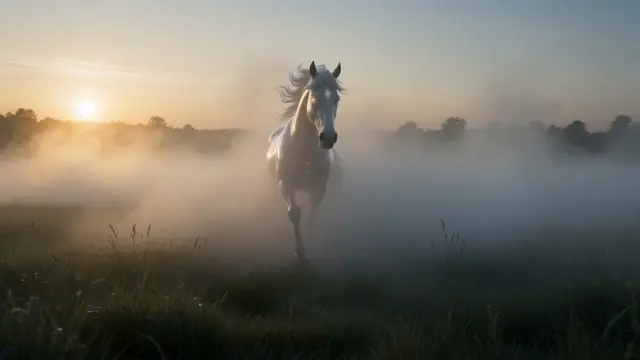


What makes Seedream 4.5 stand out
Up to 4K resolution
Render at up to 4K for banners, wallpapers, and assets that will be viewed large or cropped aggressively.
Seedream realism
Carries the family’s signature strengths — believable light, convincing materials, and natural-looking people.
Detail that holds up
High-resolution output preserves fine texture and small elements that lower-res renders tend to smear.
Every framing preset
Widescreen, vertical, square, 4:3, and 3:4 options in the studio cover web, social, and display formats.
One shared credit balance
The same credits power Seedream 4.5 and every other image and video model on Flux 3 AI.
Watermark-free files
Download your 4K renders clean from the library, ready to place directly into a design or campaign.
Popular use cases
Why creators run Seedream 4.5 on Flux 3 AI
- One shared credit balance funds 4K Seedream renders and every video model on the platform.
- Free starter credits are enough to judge Seedream 4.5’s 4K detail before buying a plan.
- Keep 4K finals and quick drafts together in a single library instead of scattered accounts.
Seedream 4.5 specs & capabilities
Output
- Generation modesText to Image
Seedream 4.5 prompt examples
Copy one as a starting point, or send it straight to the Create studio.
“Sprawling medieval market city at dawn viewed from castle walls, hundreds of tiny figures and stalls, crisp atmospheric haze, ultra-wide panoramic composition”
Detail-density stress test where the 4K ceiling really shows.
“Close-up of honeycomb dripping over rustic bread, backlit amber glow, razor-sharp texture on every cell, square composition built for ecommerce zoom”
Macro food texture that must survive aggressive zoom and cropping.
“Snow leopard resting on a rocky Himalayan ledge, every strand of fur defined, overcast diffuse light, rule-of-thirds placement against distant peaks”
Fine fur detail at high resolution with soft natural lighting.
Create with Seedream 4.5 in three steps
Describe your idea
Write a prompt — the more specific the scene, motion, and style, the better Seedream 4.5 performs.
Pick Seedream 4.5 & settings
Choose your aspect ratio and options. The studio shows the exact credit cost before you generate.
Generate & download
Seedream 4.5 renders in the cloud — track progress in your library, then download watermark-free or share with a link.
Seedream 4.5 questions, answered
What is Seedream 4.5?
Seedream 4.5 is a ByteDance text-to-image model that generates images at up to 4K resolution. On Flux 3 AI it runs in the browser-based Create studio, sharing one credit balance with the rest of the model catalog.
Can Seedream 4.5 really generate 4K images?
Yes — up to 4K output is Seedream 4.5’s headline capability in the Flux 3 AI catalog. That makes it a strong pick for assets that will be displayed large, printed, or cropped heavily in post.
Seedream 4.5 vs Seedream 5 Pro — what’s the difference?
Seedream 5 Pro is the newer flagship focused on peak overall quality, while Seedream 4.5 is the established tier with output up to 4K. Choose 4.5 when raw resolution is the priority; try both on the same prompt to judge quality for your use case.
Is Seedream 4.5 good for product photography-style images?
It is a popular choice for that job. The Seedream line renders materials, reflections, and studio-style lighting convincingly, and the 4K ceiling means ecommerce zoom views stay sharp.
How do I use Seedream 4.5 on Flux 3 AI?
Open the Create studio, select Seedream 4.5 from the image model list, write your prompt, pick an aspect ratio, and generate. New accounts get free credits to experiment before choosing a plan.
Are Seedream 4.5 images watermarked?
No. Everything you generate downloads from your Flux 3 AI library at full quality without a visible platform watermark.
Can I use Seedream 4.5 output in client work?
Yes — commercial use of images generated on Flux 3 AI is permitted under the platform terms, so 4.5’s high-resolution renders can go straight into paid projects.
Can I generate with Seedream 4.5 through an API?
Yes — Flux 3 AI exposes API access for developers, described in the homepage API section, so Seedream 4.5 renders can be triggered from your own pipeline as well as from the browser studio. Both routes draw on the same credit balance.
Seedream 4.5 vs GPT Image 2 — which should I pick for 4K images?
Both render at up to 4K on Flux 3 AI. Seedream 4.5 leans toward the photographic realism the ByteDance line is known for, while GPT Image 2 is OpenAI’s high-resolution generator. Run the same brief on each — one credit balance covers both — and keep the stronger frame.